
1
Upload a PNG diagram
Start with a PNG export, transparent PNG, high-resolution screenshot, or archived process map.
Upload a PNG diagram export, transparent PNG, high-resolution screenshot, or archived process map. ImageToEditable reconstructs the visible structure as an editable Draw.io-compatible draft.
Supported inputs
Editable examples
A PNG, screenshot, or exported diagram image in Draw.io is still just pixels. ImageToEditable rebuilds the visible structure as editable boxes, labels, and connectors you can export to Draw.io.
Before
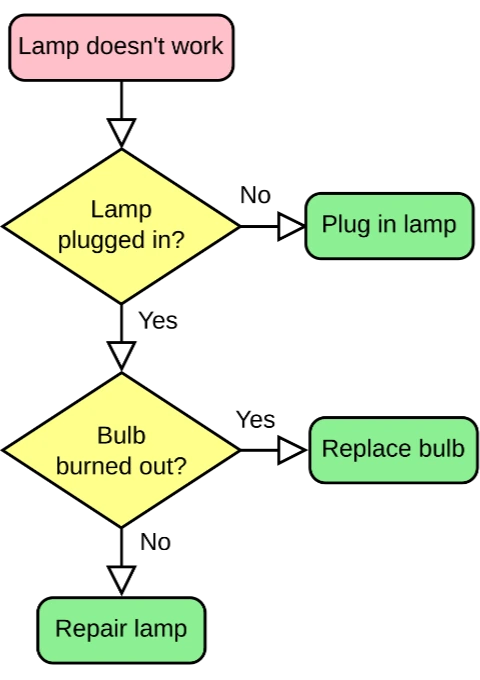
Locked pixels, labels cannot be edited
After
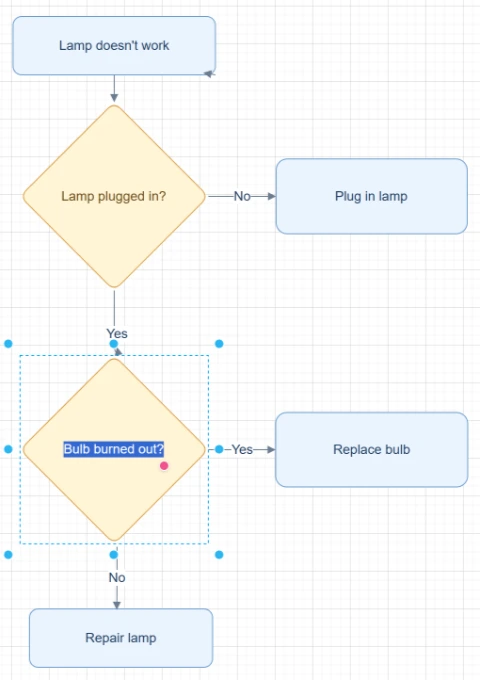
Editable boxes, labels, and connectors
Best for clear diagrams with readable labels and visible arrows. Review dense layouts before export.
Convert to Draw.ioStart with the source file, let AI rebuild the visible structure, then review the editable result on canvas.
Start with a PNG export, transparent PNG, high-resolution screenshot, or archived process map.
ImageToEditable detects readable labels, shape boundaries, arrows, connectors, and layout from the bitmap image.
Open the reconstructed result in Modern Style, fix any labels or connectors, and export through the Draw.io-compatible workflow when available.
Editable result
ImageToEditable rebuilds the visible diagram as editable diagram objects, so the output can be reviewed and refined instead of staying locked inside a flat image.
Review and edit visible text labels after the diagram is rebuilt.
Move, resize, add, or remove process boxes, decision nodes, and other diagram elements.
Reconnect arrows, adjust flow direction, and fix unclear branches when needed.
Clean up spacing, alignment, grouping, and reading order on the editable canvas.
Image conversion workflows
Choose the converter that matches your source image or the editable output you need.
Recover editable flowchart structure from a PNG export when the original source file is missing.
Reconstruct diagrams stored as transparent PNG assets without treating the image as a single locked object.
Convert PNG diagrams saved from docs, wikis, or help center articles into editable diagrams.
Use a remaining PNG as the starting point for a new Draw.io-compatible editing workflow.
Turn large process map exports into editable drafts for cleanup, updates, and sharing.
Before you upload
PNG to Draw.io conversion helps when a flowchart, process map, or diagram only exists as a static PNG export.
ImageToEditable analyzes the visible PNG image and reconstructs the diagram as editable text, shapes, arrows, connectors, and layout.
Many PNG diagram files are static bitmap exports, so the boxes, labels, and arrows inside the image are not directly editable as source diagram objects.
ImageToEditable creates a new editable diagram draft from what is visible in the PNG, giving you a practical starting point when the original source file is gone.
High-resolution PNGs with readable labels, visible arrowheads, clear connector lines, and strong shape boundaries work best.
Low-resolution, heavily compressed, cropped, or low-contrast PNGs can still produce a useful draft, but the result usually needs manual cleanup before sharing.
Results and quality
Upload a clear PNG, JPG, JPEG, or SVG diagram image. For a diagram inside a document, export or capture the relevant page as an image first.
Export availability follows the current ImageToEditable canvas export options.
Continue from the converted diagram without rebuilding the file.
Continue refining the rebuilt diagram with manual edits.
Export the finished diagram as a Draw.io, Mermaid, Excalidraw, PNG, or SVG file when available.
Check labels, shapes, arrows, and connectors before you share the result.
FAQ
Upload a PNG diagram export and turn the visible flow into an editable Draw.io-compatible draft you can review, refine, and export.